
Today, users have many options for streaming devices because plenty are available on the market. Among the teaming choices are Amazon Fire TV Stick and Roku. Roku and Firestick allow users to use a remote to control the TV and scroll down features.
Roku has added its operating system to popular brands like Phillip to give you that great feeling. One feature of Fire TV that stands out is its wide range of built-in browsers.
Since Amazon and Roku produce terrific streaming devices, deciding which is better can be tricky. However, there are two sides to every coin. Even though they provide similar services to teeming users, there must be some differences in their features. If you don’t know which one to choose, we are here to help with a detailed comparison of every standout feature in both devices, including their drawbacks. Let’s dive in.
How to Use Roku and Amazon Fire TV Stick with a VPN – Quick Guide
- Pick a trusted VPN service. We recommend NordVPN.
- Install the VPN app on the Firestick and configure the VPN on the router for Roku.
- Log in and connect to the server.
- Check the Firestick IP address and connect Roku to the VPN network.
- Test access to geo-restricted content and enjoy 4K streaming.
Editor’s Tip: Best VPN Services to Use
Unleash a world of streaming magic on your Fire TV and Roku with the help of a top-notch VPN. Say goodbye to geo-restrictions and dive into a universe of exciting content no matter where you are. Here are some stellar VPN options to elevate your streaming game:
What is Roku?
Roku is an operating system for smart TVs, intelligent audio products, and streaming devices produced and sold by Roku Inc., a US-based company. Like Apple’s TVOS, Amazon’s Fire OS, and Android TV OS by Google, Roku OS is mainly for streaming TV. Its smart TV products are designed primarily to help users access media content online. You can connect Roku to your computer or TV using HDMI for as little as $29. This package comes with a remote for easy use.
Soundbars costing around $129 are also part of Roku products. The price of sound bars determines the quality of sound you will get. The sound played comes from your TV and gives the Roku operating system access. Roku also sells accessories like headphones and remote controls. Roku is taking the TV experience to a new level by partnering with brands. Brands like Phillips, Hisense, and LG use Roku’s operating system for built-in TV streaming.
Availability: In Which Countries You Can Get Roku?
| Countries |
| Australia |
| France |
| The UK |
| Argentina |
| Chile |
| Mexico |
| Canada |
| Germany |
| Brazil |
| Colombia |
| Peru |
What is the Amazon Fire Stick?
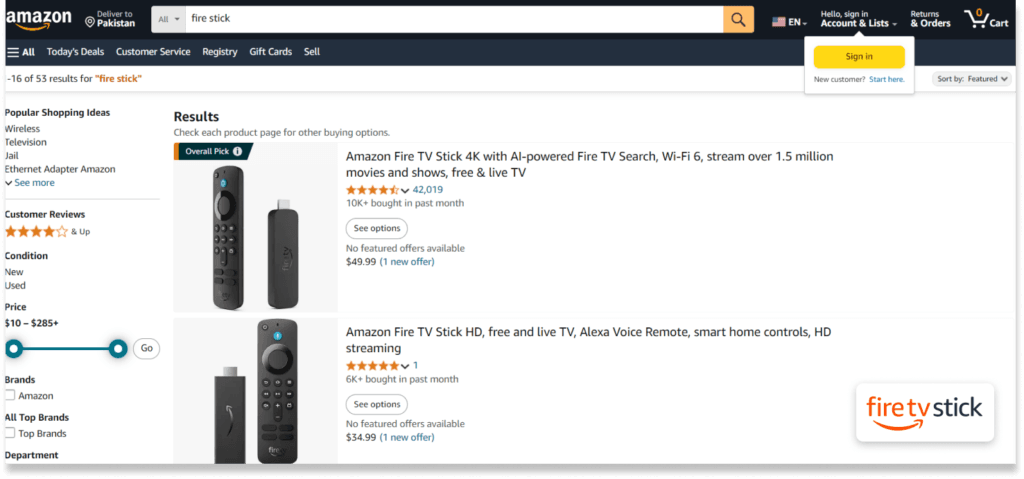
Amazon TV Firestick works similarly to Roku in terms of streaming. Its lowest media and remote package is $34. However, this is different everywhere, as each location has its unique price. The sound bars of both devices are the same.
Amazon Nebula is much more expensive, at about $200.This hike in price can be best explained by its voice control feature. One backdrop of the Firestick is that it is not pre-installed on a TV. This is not a threat to Firestick, as it can one day have a TV like Roku. Also, Fire TV Stick Lite, Fire TV Stick 4K Max, Amazon Fire TV Cube, and other streaming devices are among the best smart home devices.
Availability: In Which Countries Can You Get a Fire Stick?
| Countries |
| The United States |
| The United Kingdom |
| Austria |
| India |
| Italy |
| Mexico |
| Australia |
| Poland |
| Netherlands |
| Canada |
| Germany |
| Japan |
| France |
| Spain |
| Brazil |
| Sweden |
Roku vs Fire TV: Which Gives Better Access?
Users must know the importance of examining how easy it is to use a Roku and Fire TV device in the United States and abroad. Buying and using these two devices is very easy in the United States. However, this is not the case for many living elsewhere, as Roku is unavailable in most other countries.
Roku is freely available in a couple of countries, such as:
It is possible to obtain Roku devices even if you do not live in any of the places listed above. This will be useful for all living within the European Union, though it might not apply to those living outside. One great thing about the Firestick device is that you can buy it from online market stores and Amazon websites. It is an example of how Amazon devices are easier to get than Roku.
Roku vs Fire Stick: Which of These Two Have Better Content?
Both devices have many popular content and streaming apps flooding the market. Each has been able to create applications that work with some of the world’s known streaming sites. Below is a list of streaming sites that work with Roku and TV Firestick.
Another difference is that Firestick has better access to Prime Video, unlike Roku. The Roku runs free and ad-support streaming, which applies to Roku. Yet Amazon has many more titles than Roku has in store. In turn, the Roku Stick 4K has to its credit many apps in thousands over Amazon Firestick. A web browser can be used when content is no longer featured in an application in which Roku or Firestick is featured.
Roku does not have an inbuilt browser, unlike Fire TV’s browser, which has quite a few. Roku will be the better choice if you need an experience other than streaming. Both devices are excellent for watching some of the best movies and shows. Remember that you must be on a paid plan to enjoy streaming services like Roku and Amazon Firestick. With the help of a VPN, you can watch as much content on each platform as you want with no barrier. The Fire TV and Roku apps do their best when streaming TV shows, movies, and TV episodes.
Roku vs Amazon Fire Stick: Which is Easier to Use?
Regarding ease of use, both Roku and Firestick work well. They both have a TV remote and an excellent interface. The interfaces of both devices are similar and easy to use. While using Firestick, you are directed toward only Amazon Prime videos. This means watching the content of other applications will be hard. This becomes a means through which Amazon can showcase its Prime videos without stress.
Roku is different, as the interface is streamlined in such a way that suits the user. It means you are given access to any streaming site of your choice. Using either Roku or Amazon Firestick remote controls is relatively easy. You will find some special buttons on Roku’s remote for Netflix, Disney+, Hulu, and Sling TV. This differs from the Firestick TV, as it is a more straightforward design. Another advantage of the Firestick is its sound bars with an Alexa voice control. It is also user-friendly and can be easily assessed over other streaming devices.
Amazon TV Fire Stick vs Roku: Which Has Better Tech Features?
Over the years, Amazon Firestick and Roku have produced and sold similar devices, making the competition much more exciting and challenging to choose the winner. For instance, the tech specs of Roku and Firestick are identical to those of GPU. Even this little detail isn’t that much, as they were just designed with a different sort of technology. Let’s quickly dive into these two giants’ more critical tech differences.
Other than what is stated above, both devices are similar in every sense of the word. They are the same regarding processors, supported audio and video formats, TV compatibility, network receivers, and ports. Below is a table comparing the Fire TV and the Roku Streaming Stick features.
| Feature | Amazon TV Firestick | Roku Stick 4K |
| Processor | Quad-core 1.7 GHz | Quad-core |
| Ports | IMG GE8300 | ARM Cortex A53 |
| Network | 802.11ac MIMO dual wireless band receiver | 802.11ac MIMO dual wireless band receiver |
| TV Compatibility | TVs streaming HD, Ultra HD, a TV with HDMI port and 4K | HD TVs,4K UHD HDR TVs, 4K UHD TVs |
| Power Consumption | About 4W | Below 3W |
| Power Input | 5V to 1A | 5V to 1A |
Amazon TV Fire Stick Versus Roku: Which Price is Cheaper?
A small Fire TV Device costs between $5 and $10, and the Firestick Nebula Soundbar costs at least $70. This is well over what buying a regular Roku sound bar costs. The price of a sound bar varies, but the Roku premium streaming device sells for $99. The Cube with Alexa is included in the package for just $79. The Fire TV Cube has almost the same Tech specs as the Roku Ultra, making it better. Look below for the prices of various devices Roku and Firestick produce.
| Price Range | Roku Device | Roku Price | Firestick Device | Firestick Price |
| Low-Tier Streaming Devices | Roku Express 4K | $25 to $30 | Amazon TV Fire Stick | $34 to $39 |
| Mid-Tier Streaming Devices | Roku Premiere | $30 to $35 | Amazon TV Firestick 4K | $40 to $50 |
| High-Tier Streaming Devices | Roku Ultra | $90 to $100 | Amazon Fire Cube | $79 to $120 |
| Soundbars | Roku Streambar | $130 | Nebula Soundbar | $180 |
Which Service You Should Use: Advantages of Each
Roku
Firestick
Choose Roku if you prefer an intuitive, black-and-white design and lots of not-very-mainstream applications to install—especially seniors and Apple users. Choose Firestick if you are an Amazon audiophile dependent on Alexa and want a better-performing, high-end streamer with gaming capabilities. Lastly, both devices are incredibly capable of streaming, so identify your needs and harmonize them with your current set of equipment.
Roku vs Amazon: Overall Comparison Table
Our researchers worldwide concluded that both services are worth using. Firestick’s easy-to-use app excels in every way, while Roku has a more straightforward interface. Almost 70% of users prefer using Roku. Below, you’ll find a detailed comparison table that outlines what each service offers.
| Features | Amazon | Roku |
| User Interface | Universal search across the web, unbiased | Simple, easy-to-navigate |
| Search Functionality | Universal search, but favors Amazon content | Universal search across web, unbiased |
| Applications Availability | 4000+ apps | 5000+ apps |
| User Profiles | Supports profiles, tailored recommendations | Multiple profiles for personalized content |
| Live TV Integration | Integrated with Amazon’s live TV services | Integrated with multiple services |
| Price Range | $30 – $180 | $20 – $130 |
| Setup Process | Straightforward, enhanced with Alexa setup | Simple, straightforward |
| 4K and HDR Support | Available on Fire TV 4K and higher | Available on higher-end models |
| Ad-Supported Content | Freevee (formerly IMDb TV), ad-supported | Roku Channel with free content, ads |
| Voice Control | Built-in Alexa | Works with Roku Voice, Google Assistant |
| Remote | Voice remote with Alexa, TV controls | Simple Roku remote with TV controls, voice |
| Casting/Mirroring | Supports Miracast, which is less seamless than Chromecast | The Roku Mobile app also supports AirPlay |
| Content Recommendations | Amazon-centric recommendations | Neutral recommendations |
| Gaming | Better gaming options with Fire TV Cube | Basic gaming capabilities |
| Audio Support | Dolby Vision, Dolby Atmos, Dolby Digital Plus | Dolby Atmos on higher-end models |
| Performance | Fast and responsive, especially Fire TV 4K | Varies by model, generally good |
| Parental Controls | Strong parental control options | Advanced parental control settings |

Connecting a VPN With the Best Streaming Device
Another advantage of Firestick over Roku is the user interface’s design. It is user-friendly, making it easy to install a VPN. Using a VPN enables you to switch from one IP address to another at any time, making you appear to be using the best streaming sites from a different region.
A VPN also allows you to unlock blocked content in your location. Netflix’s hidden shows can be easily assessed by using a trusted VPN. For example, anyone outside the United States can access Peacock with a VPN. Using Firestick is far easier than using Roku, which requires a VPN installed on your router. This makes the whole process of Roku more complex for the average user. You can also download your favorite apps using a VPN if restricted.
The Best VPN Services to Use on Amazon Firestick and Roku – Detailed List
1. NordVPN
NordVPN is the best option and is most well-liked globally. It provides unparalleled security and privacy as a shield for users while browsing the internet. With over 6,300 servers dispersed across more than 110 countries, users can access anything they want with just a single click. Its unique features for safe internet browsing are split tunneling and a kill switch, ensuring user security and privacy.
Other excellent features offered by NordVPN include threat protection, which shields users against malware, web trackers, ads, and other online threats; meshnet, which enables users to share files securely; dedicated IP, which lets users maintain their online persona, access blocked content, and avoid blocklists; and dark web monitor, which notifies users if any of their personal information is available on the dark web. Additionally, NordVPN has released NordLayer, a new version designed specifically for organizations seeking increased security and protection.
Pros
Cons
2. ExpressVPN
Our top second pick and the most reputable, well-liked service provider is ExpressVPN. Users like its excellent privacy and security features and easy-to-use interface, making it the most popular VPN service in the world. Thanks to ExpressVPN’s broad server network, customers can access anything globally. Players can access any platform, play games, stream material, and visit any website. With over 3000 servers dispersed over 105 countries, ExpressVPN ensures safe access anywhere.
With features like IP leak prevention, DNS leak prevention, ad blocker, malware protection, dedicated servers, 256-AES encryption, split tunneling, kill switch, malware protection, and VPN protocols, including IPv6, IKEv2, OpenVPN, and WireGuard, this is the most reliable VPN service available. ExpressVPN offers up to eight simultaneous connections with its user-friendly apps for all major platforms, including iOS, Android, MacOS, Windows, Linux, routers, Chrome, Edge, Firefox, and Smart TVs. It also comes with 24/7 customer support and a 30-day money-back guarantee.
Pros
Cons
3. Private Internet Access
Private Internet Access (PIA) gives consumers a safe way to access the Internet and lets them join from any public network. PIA offers a global server network of 35000 servers in 91 countries. Thanks to its ad-blocker, customers may browse with more excellent organization and security. PIA protects its clients against dangerous domains and online infections by preventing access to dubious websites. Customers may browse and access an infinite amount of stuff at all times with PIA. The business provides round-the-clock email, live chat, and online database client support.
PIA ensures its clients’ browsing histories and private information are safe and secure online by using military-grade encryption methods like OpenVPN, WireGuard, and IKEv2. These safeguards guard user data from potential online dangers. Up to ten simultaneous streams may be made using PIA’s cross-platform streaming capabilities on routers, Windows, Linux, Android, iOS, and macOS.
Pros
Cons
How to Choose the Best VPN to Use on Amazon Fire Stick and Roku
Can You Use a Free VPN on Fire Stick or Roku?
You must ask about their primary intention because many ‘free’ VPNs and ‘free proxies’ are available. It is a topic that questions how providers of such services can fund their operations when they do not require payment from consumers. Free VPNs and proxies that contain malware can profit from your internet activity by collecting and reselling your data, displaying intrusive advertisements, and storing personal information, including usernames, photos, and passwords. Beware hackers and privacy breaches; understand the hidden fees of the so-called ‘free’ VPNs.
NordVPN, ExpressVPN, and Private Internet Access put their efforts into providing every user the best experience regarding speed, privacy, and security. These VPNs will, in turn, procure a network of high-performance servers located in over 100 countries to ensure this. Professional developers and designers improve the apps and, from time to time, add privacy features. If you are looking for a risk-free VPN trial, you can safely try these VPN services with a 30-day money-back guarantee. Also, using these VPN services, you can access many popular streaming apps and channels, Like YouTube TV, and watch restricted TV shows and movies.
Amazon Fire TV or Roku Not Working? Here’s What to Do
If you are facing any problems while connecting to your device, follow the steps below:
Verdict: Which is a Better Option Between Amazon Fire Stick and Roku?
Amazon and Roku are good choices, but we picked the Firestick as the better choice. The answer is plausible as it supports VPN installation, is more flexible to use, has more storage, and has an inbuilt Alexa sound bar. VPNs can make your streaming experience more seamless since they let you bypass geo-blocking firewalls and secure your data. However, the must-consider difference between Roku and Fire TV is that Roku does not support VPNs.
On the other hand, Firestick allows you to stream movies with a VPN, so many would choose it over Roku. But settling for Roku is a good choice since it has its strengths. Roku’s standout features include a more extensive array of library content, a better interface, and a lower price than Amazon. Looking at both strengths will give you an idea of what best suits your needs.
Frequently Asked Questions
A lover of Prime Video should opt for the Firestick, especially when installing a VPN and accessing Alexa features. If you care about storage space and an excellent interface and want to subscribe to several streaming services, choose Roku. Whatever your choice, you will not be making the wrong one, as both are great in their unique ways.
The only payment you have to make is when you buy devices from Amazon or Roku. However, it would be best to be on a paid plan to enjoy streaming content from sites like Netflix and Disney.
Devices owned by Roku are cheaper, but this depends on the region, special offers, and deals at the time of purchase. This does not include the premium Roku and Ultra Roku, as they are costlier than their Fire Stick counterparts.
A VPN allows you to change from one IP address to another to stream content in other locations. It gives the feeling that you are changing locations while still in one place. These VPNs include NordVPN, ExpressVPN, and Private Internet Access (PIA).
Using Roku within the United States and Europe is very simple, but you must install a router to a VPN. However, Amazon Stick users can easily install its app.
Google Chromecast with Google TV (4K TV) is the best alternative.